
AI Watermark Remover
Erase distracting logos, text, and overlays with AI Watermark Remover. Advanced inpainting restores clean backgrounds in seconds—upload, process, download.
Feedback
AI Tools
Explore AI tools
MiniMax H3
MiniMax H3 AI Video Generator
Seedance 2.5
The Future of AI Video Is Here.

Seedance 2.0
The Future of AI Video Is Here.

Veo3.1
Create Stunning Videos with Veo3.1
FLUX 3 Video Generator

Kling 3.0
Next-Gen AI Video Generator
Grok Video Generator
Create Videos from Text or Images with AI
MiniMax H3 video generator
MiniMax H3 AI Video Generator

AI Watermark Remover Explained: Fast, Clean Photo Restoration
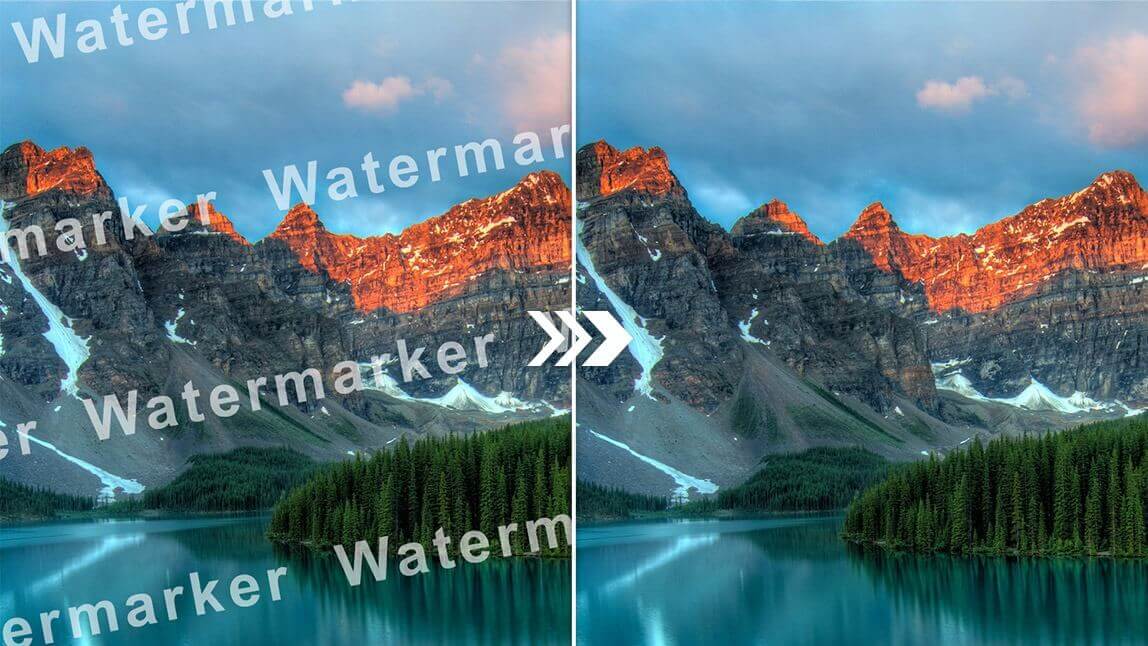
AI Watermark Remover detects watermarks, logos, and overlays automatically, then rebuilds background texture so every photo looks natural and untouched.
- Multi-Image ProcessingClean an entire set of images in a single run to save precious time.
- Smart Pattern LocatorNo need to select areas—AI Watermark Remover finds logos and watermark patterns on its own.
- Context-Aware RestorationRebuilds background textures and details so your final image looks completely natural.
Using AI Watermark Remover in Three Quick Steps
Erase unwanted marks in just three simple steps: upload your photo, let the AI locate the watermark, and download the clean result.
Capabilities That Make AI Watermark Remover Stand Out
From stock photos to social media posts and e-commerce product shots, AI Watermark Remover removes unwanted logos and overlays in one powerful pass.
Bulk Cleanup
Upload many images at once and let the tool clean them together.
Automatic Mark Detection
The AI engine finds watermark patterns without you lifting a finger.
Complex Overlay Handling
Handles tricky full-screen and semi-transparent watermarks with ease.
Quick Turnaround
Most images are processed in just seconds.
Natural Restoration
Rebuilds texture, light, and color so no one can tell an edit happened.
Original-Resolution Export
Download clean files in the same high resolution as the source.
Your Top AI Watermark Remover Questions, Answered
Quick, clear answers about AI Watermark Remover and how to erase watermarks from photos without losing quality.
What can AI Watermark Remover do?
It is a free online tool that uses AI to erase full-screen watermarks from images. Just upload a photo and receive a clean result automatically.
Is batch watermark removal supported?
Absolutely—AI Watermark Remover can clean multiple images in one session, so large projects finish much faster.
How long does it take to remove a watermark?
Most images are processed by AI Watermark Remover in just seconds: upload, wait a moment, and download the clean photo.
Will removing a watermark reduce photo quality?
No—AI Watermark Remover maintains original sharpness, texture, and color while eliminating marks.
Can I use AI Watermark Remover for free?
Yes. The core watermark removal service is free, with optional premium features for advanced workflows.
Which kinds of watermarks can it erase?
AI Watermark Remover works on stock photo logos, social media badges, e-commerce marks, document watermarks, and more.
Ready for Spotless Images? Try AI Watermark Remover Today
Stop letting logos ruin your photos. AI Watermark Remover delivers clean, high-resolution results in seconds—completely free and no sign-up needed.